Claude Agent Teams: How Multi-Agent Coding Cuts Build Time
Claude Opus 4.6, launched on February 5, 2026, is widely praised for its 1 million token context window and native Agent Teams capability. In a 48-module full-stack application test, orchestrator-led teams cut build time from 6 hours to 90 minutes while maintaining production-grade output quality.
Instead of handling complex tasks sequentially, Claude Opus 4.6 spawns an orchestrator that delegates work to specialized teammates: each with focused system prompts, tool access, and permission boundaries.
Before you can use agent teams, you must enable the feature. There are two ways to enable teammates:
Method 1: Environment variable (shell):
bashexport CLAUDE_CODE_EXPERIMENTAL_AGENT_TEAMS=1
Then restart Claude Code for it to take effect.
Method 2: settings.json Add it to the env block in your Claude Code settings.json:
json{ "experimental": { "agentTeams": true } }
To start, you tell Claude to create an agent team in natural language. One session acts as team lead — it coordinates work, assigns tasks, and synthesizes results.
Teammates are separate Claude Code instances, each with its own context window, that work independently and communicate directly with one another. They share a task list with pending/in progress/completed states.
You can navigate between teammates using Shift+Up/Down in in-process mode, or by clicking the pane in split mode (which uses tmux or iTerm2).
Good use cases: parallel code reviews, debugging with competing hypotheses, multi-module feature development, and research exploration from different angles.
Agent Teams differ from single-agent workflows: An orchestrator assigns roles (research, planning, execution, review, documentation), sets guardrails, and synthesizes outputs. Workers operate in parallel sessions with independent contexts, eliminating contention for the context window.
Anthropic solution architects call this “Operationalizing Claude for Multi-Agent Delivery”: moving from prompt engineering to swarm management.
This guide documents setup, security boundaries, approval workflows, and known friction points for teams running multiple Claude agents at scale. If you’re managing complex software projects, deep research initiatives, or operations requiring parallel execution, Agent Teams compress cycle time without sacrificing quality control.
Who This Guide Is For
- Developers building multi-module applications requiring parallel workstreams.
- Product managers coordinating cross-functional work with tight deadlines.
- Engineering leads deploying complex systems where sequential execution creates bottlenecks.
- Research teams synthesizing large datasets or conducting multi-angle investigations.
- Operations managers orchestrating workflows that span coding, documentation, QA, and deployment.
- Not a fit: single-task projects, users without CLI comfort, teams requiring full autonomy without human approval gates, projects where per-token API costs exceed budget constraints.
💡 What Makes This Guide Different - Swarm management focus – Documents orchestrator setup, worker coordination, and output synthesis rather than single-agent prompting. - Parallel deployment approach – Shows how to run independent agent sessions simultaneously without context contamination. - Real constraints – Covers API cost scaling, hallucination risks in parallel execution, merge conflict resolution, and token budget management. - Operator style – specific orchestrator prompts, handoff protocols, verification checkpoints before auto-execution.
Core Concepts
- Orchestrator Agent – Master coordinator that receives complex tasks, decomposes them into subtasks, assigns work to specialists, enforces constraints, and synthesizes final outputs.
- Worker Agents – Specialized teammates with focused system prompts (code, research, QA, documentation, deployment) operating in separate sessions with independent contexts.
- Adaptive Thinking – Extended reasoning mode where agents show their work step-by-step before execution, reducing hallucination risk.
- Compaction – Automatic summarization of long exchanges to preserve context window capacity for new information.
- Subagents vs. Agent Teams – Subagents share a single session context (lower cost, faster handoffs); Agent Teams run parallel sessions (independent contexts, true parallel execution).
- Tool Access Control – Permission boundaries using allowlists (grant specific tools) or denylists (block specific tools) to prevent agents from executing unauthorized actions.
- Skills Injection – Preloading domain knowledge into agent system prompts at startup to reduce repetitive context provision.
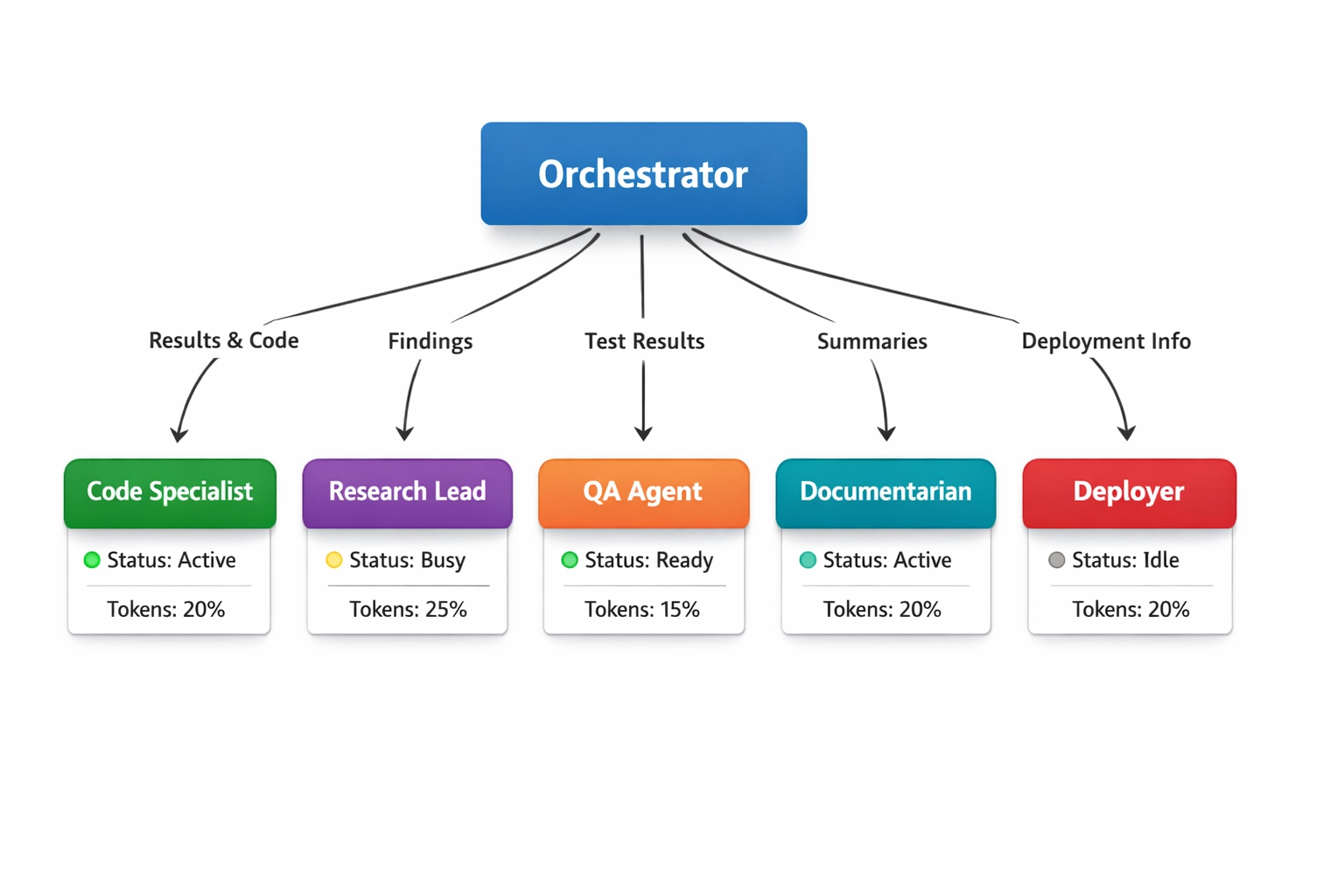
Orchestrator receives complex task, spawns specialized worker agents with independent contexts, synthesizes outputs after parallel execution cycles complete.
What Claude Multi-Agent Is Good At
- Large-Scale Coding Projects – Building multi-module applications where frontend, backend, database, and API layers develop in parallel.
- Deep Research Synthesis – Running simultaneous investigations across different angles, datasets, or source types, then merging findings.
- Operations Orchestration – Coordinating workflows spanning code generation, testing, documentation, deployment, and monitoring.
- Quality Assurance at Scale – Parallel testing across multiple scenarios, edge cases, and integration points.
- Technical Documentation – Generating API docs, user guides, architecture diagrams, and deployment runbooks while code development continues.
- Refactoring Legacy Systems – Analyzing codebases in parallel chunks, proposing improvements, testing changes, updating documentation simultaneously.
Concrete Example: Explicit Requests
Vague – “Build me an e-commerce platform” Operator Request to Orchestrator – “Claude Orchestrator, decompose this task into specialized workers:
- Code Specialist: build product catalog API with PostgreSQL backend
- Frontend Lead: create React storefront with cart functionality
- QA Agent: write integration tests for checkout flow
- Documentarian: generate API docs and deployment guide
- Deployer: containerize application with Docker, prepare Kubernetes manifests
Run workers in parallel sessions. Code Specialist and Frontend Lead may begin immediately. QA waits for the first working build. Documentarian tracks all three. Deployer executes only after QA approval: ”Show me the synthesis plan before workers start.“
Anatomy – Name orchestrator explicitly, define worker roles with clear boundaries, specify dependencies between workers, establish approval gates, request synthesis preview before execution starts.
Principle – Orchestrators excel at coordination when you define roles, handoffs, and approval checkpoints upfront. Vague delegation creates parallel hallucinations and merge conflicts.
Video Demo/Review
Recommended: ”Claude Opus 4.6: Agent Teams Change Everything“ on YouTube. Shows an unscripted orchestrator deployment building a full-stack application with five parallel workers. Watch for orchestrator’s task decomposition logic, worker handoff protocols, and merge conflict resolution when frontend and backend agents produce incompatible schemas.
Prerequisites & Requirements
- Account tier – Claude Pro ($20/month); Recommended: Claude Max ($100 or $200/mo.).
- CLI tools – Claude Code CLI installed, Docker Desktop running, Git configured.
- Development Environment – Local machine with 16GB+ RAM for parallel agent sessions.
- API access – Anthropic API key if running agents programmatically outside Claude Code interface.
- Context budget – 1M token context shared across orchestrator and all workers, requires planning token allocation per agent.
- Approval workflow comfort – Teams must review synthesis plans and grant execution permissions; full autonomy not recommended for first 50 tasks.
Security
- Sandboxing – Each worker agent operates in an isolated environment with restricted file system access.
- Tool boundaries – Orchestrator sets allowlists per worker (e.g., Code Specialist gets file write, API calls; Deployer gets Docker, Kubernetes; Documentarian gets read-only access).
- Human-in-the-loop approvals – Orchestrator shows synthesis plan before worker execution begins; major actions (deployments, database migrations, external API calls) require explicit user confirmation.
- Credential isolation – Workers cannot access environment variables or secrets unless explicitly granted via orchestrator.
- Audit logging – All worker actions logged with timestamps, tool calls, and outputs for post-execution review.
- Separation strategy – Run production deployments from dedicated accounts separate from experimental orchestrator work.
Setup
10a. Orchestrator Setup
- Launch Claude Code CLI –
claude-code init. - Define orchestrator role – “You are Orchestrator managing specialized worker agents for [project type].”
- Set context allocation – Reserve 200K tokens for orchestrator, distribute remaining 800K across workers.
- Configure approval gates – Default to review-before-execution; grant auto-approve only after proven reliability.
- Establish communication protocol – Workers report status to orchestrator, orchestrator synthesizes updates for user.
10b. Code Specialist Worker
- System prompt – “You are a Code Specialist focusing on backend logic, database schemas, API endpoints. Output production-ready code with error handling.”
- Tool allowlist – File write, Git commits, package installation, local server startup.
- Tool denylist – External API calls, deployment commands, database migrations without approval.
- Handoff protocol – Code Specialist signals completion to QA Agent when tests can begin.
10c. Research Lead Worker
- System prompt – “You are Research Lead conducting deep investigations. Prioritize primary sources, flag conflicting data, and synthesize findings with confidence levels.”
- Tool allowlist – Web search, document parsing, data analysis libraries.
- Tool denylist – File system writes, external service calls.
- Parallel mode – Research Lead may spawn sub-investigators for independent research angles.
10d. QA/Testing Worker
- System prompt “You are QA Agent writing comprehensive tests. Cover happy paths, edge cases, error conditions. Block deployment on test failures.”
- Tool allowlist Test framework execution, local environment manipulation, log analysis.
- Dependency QA waits for Code Specialist’s working build before starting.
- Approval gate QA must explicitly approve before Deployer executes.
10e. Documentarian Worker
- System prompt – “You are a Documentarian generating clear technical documentation. Include setup instructions, API references, architecture diagrams, and troubleshooting guides.”
- Tool allowlist – File write (docs directory only), diagram generation, markdown formatting
- Tool denylist – Code execution, deployment actions
- Continuous mode – Documentarian tracks all worker outputs, updates docs in real-time
10f. Deployer Worker
- System prompt – “You are Deployer responsible for containerization and production deployment. Verify all tests pass before executing. Confirm resource limits and environment variables.”
- Tool allowlist – Docker build, Kubernetes apply, environment variable injection
- Tool denylist – Database migrations, external API calls
- Approval gate – Deployer requires explicit user confirmation before production deployment
10g. Health Check
- Verify orchestrator can spawn all defined workers without error.
- Test communication – Orchestrator sends task to one worker, confirms status report returns.
- Validate tool boundaries – Attempt unauthorized action (e.g., Documentarian tries code execution) and confirm denial.
- Check context allocation – Monitor token usage across orchestrator and workers during test task.
- Confirm approval workflow – Orchestrator requests permission before worker execution, waits for user confirmation.
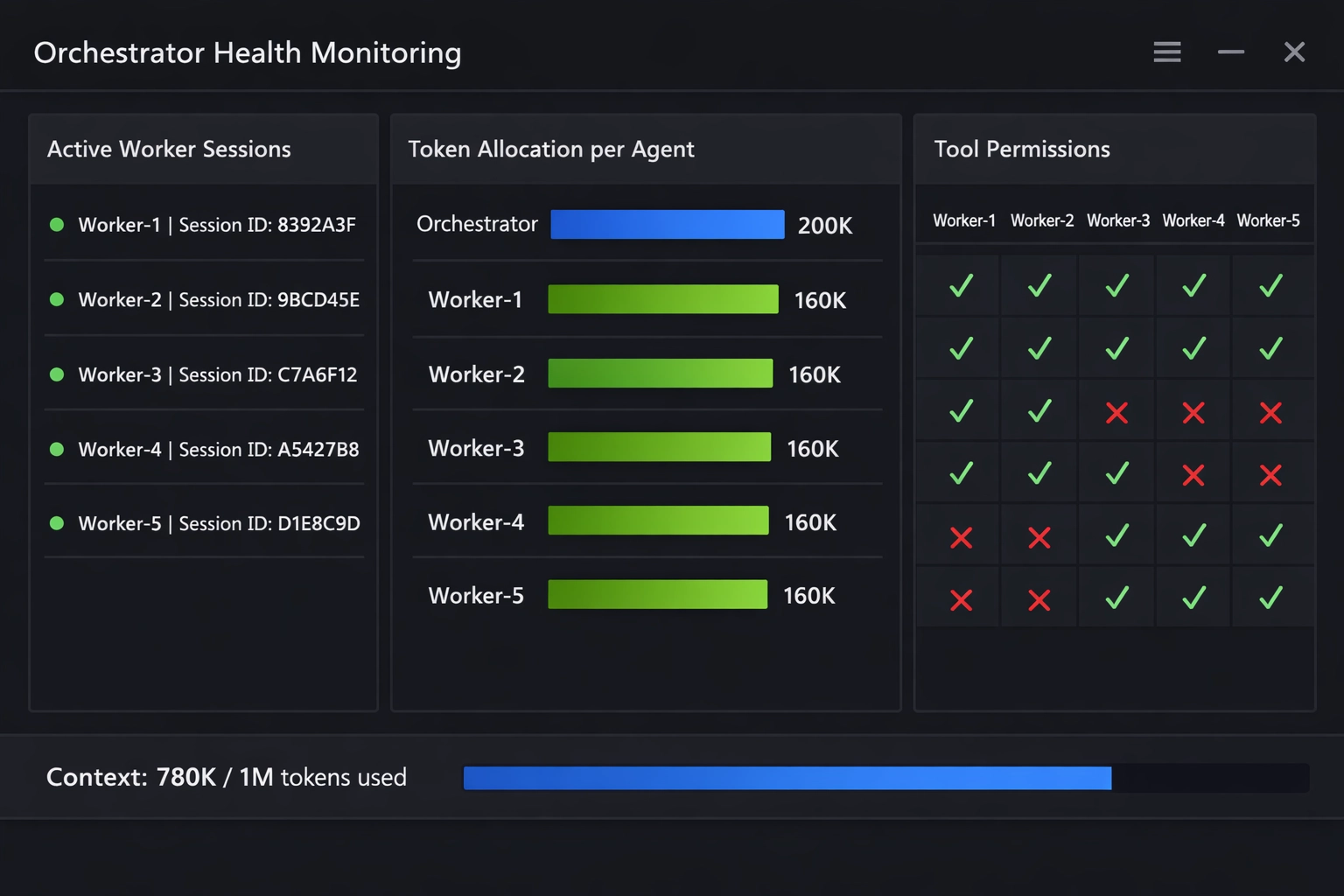
Caption: Orchestrator health check dashboard showing active worker sessions, token allocation per agent, tool permission boundaries, and pending approval requests.
Gotchas
- API Cost Scaling – Multiple parallel agents consume tokens simultaneously; 5-agent swarm costs 5× single-agent rate.
- Parallel Hallucinations – Workers operating independently may generate conflicting outputs (e.g., incompatible API schemas).
- Merge Conflicts – Code Specialist and Frontend Lead producing simultaneous changes require orchestrator-managed reconciliation.
- Context Contamination – Shared context between workers creates interference; use Agent Teams (separate sessions) for true independence.
- Token Budget Exhaustion – Long-running tasks with multiple workers may hit 1M token limit mid-execution.
- Loop Detection – Poorly defined worker dependencies create circular waits (QA waits for Code, Code waits for QA approval).
- Over-Specialization – Too many workers with narrow roles increases coordination overhead beyond efficiency gains.
- Approval Fatigue – Excessive approval gates slow execution; balance oversight with velocity.
Troubleshooting
- Workers not spawning – Verify Claude Code CLI updated to latest version supporting Agent Teams
- Orchestrator ignoring instructions – Increase system prompt specificity; add explicit worker role definitions.
- Token limit hit mid-task – Reduce worker count, enable Compaction for long exchanges, archive completed subtask contexts.
- Conflicting outputs from parallel workers – Define clearer handoff protocols, establish single source of truth (e.g., Code Specialist owns schema definitions).
- Workers executing unauthorized actions – Tighten tool allowlists, review orchestrator’s permission delegation logic.
- Circular dependencies detected – Map worker task graph, identify cycles, add explicit execution order to orchestrator prompt.
- Approval requests timing out – Check orchestrator’s human-in-the-loop configuration, confirm notification delivery.
- Merge conflicts in version control – Use Deployer as final arbiter, grant merge authority to single worker, require orchestrator synthesis before Git operations.
Workflows Worth Copying
- Parallel Development Cycles – Code Specialist builds backend, Frontend Lead builds UI, QA writes tests simultaneously; orchestrator merges outputs every 30 minutes.
- Deep Research Swarms – Research Lead spawns 4 sub-investigators examining different source types (academic papers, industry reports, news coverage, technical docs), synthesizes findings with confidence scores.
- Continuous Documentation – Documentarian monitors all worker outputs in real-time, updates architecture diagrams and API docs as code evolves.
- Staged Deployment Pipeline – Code Specialist completes module → QA runs tests → Documentarian updates deployment guide → Deployer executes only after all approvals received.
- Legacy Refactoring – Orchestrator partitions codebase into chunks, assigns analysis to parallel Code Specialists, synthesizes refactoring plan, coordinates implementation across workers.
Starter Prompts
Orchestrator Initialization “You are Orchestrator managing a 5-agent team building [project description]. Workers: Code Specialist (backend), Frontend Lead (UI), QA Agent (testing), Documentarian (docs), Deployer (production). Reserve 200K tokens for coordination. Require approval before Deployer executes. Show synthesis plan before spawning workers.”
Task Decomposition “Decompose this feature request into parallel subtasks for each worker. Define dependencies explicitly. Estimate token budget per subtask. Identify approval gates. Output execution graph before starting.”
Merge Conflict Resolution “Code Specialist and Frontend Lead produced conflicting API contracts. Compare outputs, identify incompatibilities, and propose a unified schema. Prioritize backward compatibility. Show resolution plan for my approval.”
Quality Gate “QA Agent found 3 test failures. Block Deployer from executing. Assign fixes to Code Specialist. Re-run tests after fixes. Proceed to deployment only after a clean test run.”
Research Synthesis “Research Lead completed 4 parallel investigations. Synthesize findings into a single report. Flag conflicting data with confidence levels. Highlight actionable insights for the product team.”
Known Limitations
- Human Oversight Required – Full autonomy not recommended; orchestrators make coordination errors requiring operator intervention.
- Cost-to-Output Ratio – Multi-agent approaches cost 3-5× single-agent for complex tasks; efficiency gains must justify increased spend.
- Learning Curve – Effective orchestrator prompts require 20-50 task iterations to calibrate role definitions and approval gates.
- Context Window Sharing – 1M token limit shared across all agents; large projects may require context archival mid-execution.
- No Cross-Session Memory – Agent Teams (parallel sessions) cannot access each other’s conversation history without explicit orchestrator relay.
- Merge Overhead – Parallel execution creates integration work; simple sequential tasks may execute faster with single agent.
- Tool Limitation Gaps – Some specialized tools unavailable in sandboxed environments; external service calls require manual verification.
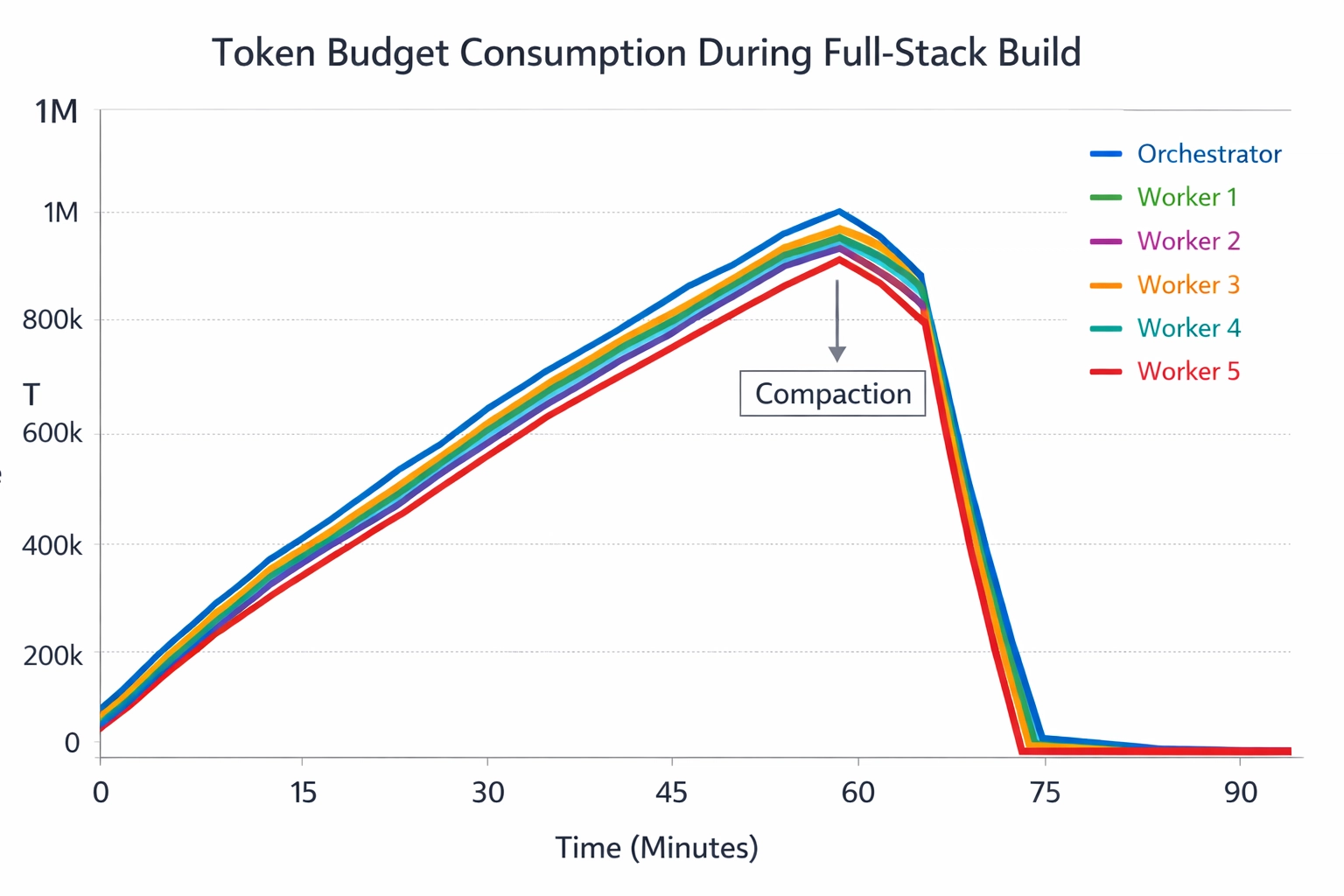
Token budget allocation across orchestrator and five worker agents during full-stack application build, showing peak usage at 780K tokens before Compaction activation.
What Comes Next
- Autonomous Deployment – Orchestrators earning trust will gain auto-approve permissions for tested workflows, eliminating approval gates for routine tasks.
- Cross-Model Agent Teams – Future versions may coordinate Claude workers with specialized models (code-focused, research-focused) for task-specific optimization.
- Persistent Team Memory – Long-term context storage enabling agent teams to remember past project patterns and user preferences across sessions.
- Swarm Scaling – Orchestrators managing 10+ workers for enterprise-scale projects requiring massive parallel execution.
- Quality Prediction – Orchestrators analyzing task complexity and predicting optimal worker count, token budget, and execution time before spawning team.
Resources
- Anthropic Documentation – claude.ai/docs/agent-teams
- Claude Code CLI – github.com/anthropics/claude-code
- Field Guide – Anthropic “Operationalizing Claude for Multi-Agent Delivery” (solution architects resource)
- Pricing – claude.ai/pricing (Pro: $20/month, Enterprise: custom)
- API Reference – docs.anthropic.com/api
- Community Examples – github.com/anthropics/agent-examples