Genspark Review: Can One AI Workspace Replace Your Tool Stack?
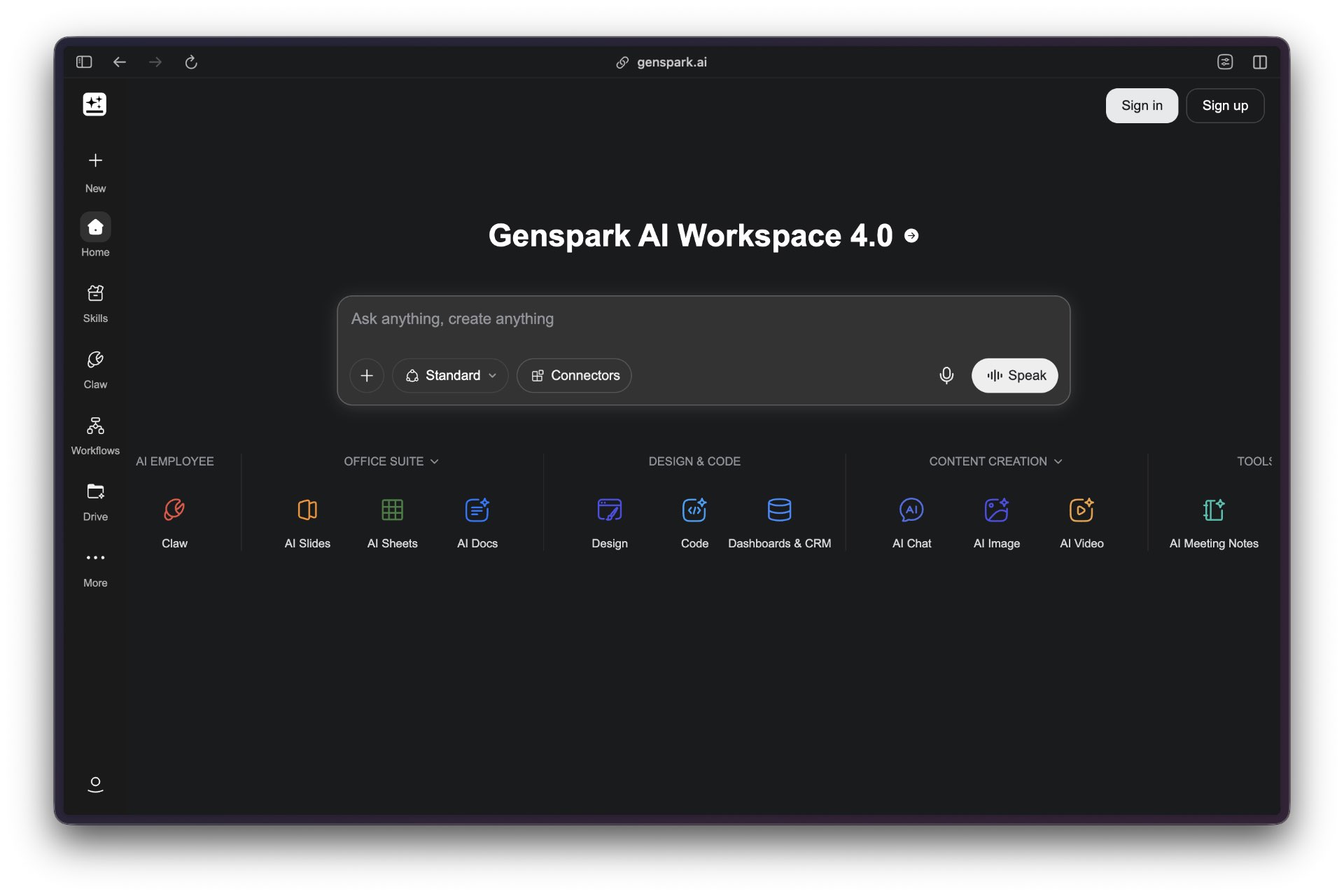
Genspark positions itself as an all-in-one AI workspace designed to replace the fragmented toolkit that defines modern knowledge work. Where professionals typically juggle separate subscriptions for email management, document creation, slide design, data analysis, and project collaboration, Genspark consolidates these functions into a unified platform built around what the company calls a “Super Agent” architecture that routes tasks across multiple AI models.
The platform’s scope is ambitious. Users can summarize email threads, draft responses in their own tone, generate presentation decks from unstructured reports, and collaborate in real time on AI-assisted documents. Beyond document workflows, Genspark includes specialized agents for podcast generation, automated phone calls, bulk file retrieval, and a no-code app builder. Recent updates introduced Speakly, a voice-dictation layer enabling hands-free interaction with the agent ecosystem, and Genspark Claw, a desktop-native agent capable of operating inside Microsoft Office applications without requiring file uploads.
This field guide evaluates Genspark across four dimensions: capability breadth (does it genuinely replace multiple tools?), execution quality (how well do individual agents perform compared to specialized alternatives?), workflow integration (can it handle multi-step processes end-to-end?), and practical friction (onboarding complexity, reliability, cost structure). The goal is to determine whether Genspark delivers on its consolidation promise today — and for which users the trade-offs make sense.
Overview
💡 What Makes This Guide Different
Most AI tool documentation focuses on ideal scenarios. This guide is closer to an operator’s logbook: what installed cleanly, what broke, what got expensive, and what created real risk.
Genspark’s core value proposition is consolidation: one workspace, one subscription, one interface for tasks that would otherwise require separate tools. The platform organizes work around a set of domain-specific agents — AI Inbox for email, AI Slides for presentations, AI Sheets for spreadsheet work, AI Designer for visuals, and AI Developer for no-code app building — each accessible from a persistent sidebar.
The company describes its routing mechanism as a “Mixture-of-Agents” architecture, though the specific number of underlying models and how tasks are assigned between them is not publicly detailed. Claims that the system routes across “30+ AI models” originate primarily from secondary user posts and forum discussions rather than official technical documentation — operators should treat this as directionally accurate rather than a verified specification.
What is confirmed from the official site and hands-on user testing: the platform produces functional outputs across slide generation, email summarization, and data cleanup tasks, with the quality depending heavily on prompt specificity and the complexity of source material.
| Plan | Price | Monthly Credits | Best For |
|---|---|---|---|
| Free | $0 | ~100/day | Testing, basic research |
| Plus | $24.99/month | 12,000/month | Freelancers, regular content creation |
| Pro | $249.99/month | 125,000/month | Agencies, high-volume teams |
Credit consumption is the most frequently cited friction point. Heavier tasks burn significantly faster: an AI Slides deck (10–15 slides) consumes roughly 250–450 credits, a short AI Video runs 800–2,000 credits, and a Call for Me session (2–4 minutes) costs 400–900 credits. At the Plus tier, this translates to approximately 10–15 substantial tasks per month — not unlimited production output. The free tier provides enough access for evaluation but not regular professional use.
Core Features and Capabilities
AI Inbox connects to Gmail, summarizes threads, identifies messages requiring a response, and drafts replies calibrated to the user’s established tone. This works as a read-and-analyze function rather than a persistent bidirectional sync — users grant access for specific sessions rather than maintaining a live connection.
AI Slides converts raw documents into structured presentation decks. Users can upload reports and issue natural-language instructions to generate stakeholder-ready slide sets exportable to PowerPoint, PDF, or Google Slides. The output prioritizes speed and structure over pixel-perfect design; users accustomed to Canva’s design controls or PowerPoint’s formatting granularity will need to refine outputs manually.
AI Sheets 2.0 handles spreadsheet tasks including data cleaning and basic insight generation. It does not replicate the statistical depth of Tableau or Excel’s formula ecosystem. For exploratory data work and basic cleanup and reshaping tasks, it performs adequately; for regression analysis or compliance-grade audit trails, dedicated tools retain advantages.
AI Designer produces visual content. AI Developer is a no-code application builder. Call for Me handles phone tasks like reservations. Download for Me manages bulk file acquisition. Each agent operates within Genspark’s closed ecosystem — there are no documented API endpoints that would allow triggering Genspark agents from external platforms like Zapier, Slack, or Notion.
Speakly is a dictation assistant for macOS and Windows that routes spoken commands to the Super Agent. It functions as a control interface for the broader ecosystem rather than a standalone transcription tool. Users expecting Dragon NaturallySpeaking-level accuracy for long-form dictation will find it limited in that role.
Genspark Claw, introduced in recent Workspace releases, is a desktop-native agent that operates locally on the user’s machine and integrates with Microsoft Office applications including PowerPoint, Excel, and Word. This expands the integration from file-upload workflows to direct manipulation — Genspark can control Office applications as a user would. A separate cloud computer add-on (Claw Cloud Computer) is reported by secondary pricing sources at an additional $39.99/month for autonomous execution outside the standard workspace.
User Interface and Experience
The interface adopts a unified workspace model with a persistent sidebar connecting all agents. New users receive free credits to explore without friction. The learning curve divides along familiarity lines: professionals accustomed to siloed tools find that consolidating tasks into a single environment reduces context-switching, but the breadth of features also creates discovery challenges. With capabilities spanning podcast generation, automated phone calls, no-code app building, and custom agent training, new users face a genuine onboarding paradox.
Natural-language commands replace traditional menu navigation in most workflows. Prompts like “Summarize my last 100 emails, highlight what needs my reply today, and draft responses in my usual tone” execute directly against the AI Inbox. This conversational retrieval approach works well for clearly scoped tasks and less well for navigating archived content or edge cases that fall outside the prompt’s framing.
The platform’s folder and organizational structures are notably underdocumented. Available reviews emphasize what the interface looks like on first use rather than how projects scale over weeks and months. For teams managing complex ongoing work, the absence of visible metadata systems, custom tags, or advanced filters is a real gap.
Integration Ecosystem
Genspark’s integration strategy centers on input/output compatibility rather than live bidirectional sync. AI Slides can export to PPTX, PDF, or Google Slides. AI Inbox can read Gmail. Genspark Claw can operate within Office applications locally. None of these constitute persistent integrations in the Zapier or Make.com sense.
The platform does not currently offer documented API access for developers. Enterprises already invested in Salesforce, Notion, Airtable, or shared Slack channels will find that Genspark functions as a parallel workspace rather than an integrated layer. Outputs must be manually transferred to existing systems. True consolidation remains aspirational for teams with established tool stacks.
| Integration Type | Status | Notes |
|---|---|---|
| Gmail (read/summarize) | Available | Session-based access, not persistent sync |
| Export to PPTX/PDF/Google Slides | Available | One-way output; no live collaboration |
| Microsoft Office (via Claw) | Available | Desktop-native agent, local operation |
| Zapier/Make.com triggers | Not available | No public API or webhook endpoints documented |
| Slack/Notion/Airtable | Not available | Manual handoff required |
Performance and Reliability
Slide generation takes “a few minutes” from uploaded documents. Email summarization and draft generation are faster. The platform operates as a cloud service requiring active internet connectivity for all AI processing; the Claw desktop agent can access local files but the inference itself depends on Genspark’s backend.
Cross-device sync relies on Genspark’s cloud infrastructure. The platform offers both web access and native desktop applications for macOS and Windows.
Concrete performance benchmarks for team sizes, document volumes, or concurrent user loads are not publicly disclosed. Documentation on data loss events, sync conflicts, or system uptime is absent from official sources and third-party reviews. For teams evaluating Genspark for mission-critical work, this gap in reliability disclosure is a real consideration — particularly given the platform’s ambition to replace multi-tool subscriptions, which would concentrate failure points.
Collaboration Features
Multiple team members can work within AI Slides simultaneously while the AI handles generation. However, the collaboration model centers on shared AI-assisted outputs rather than human-to-human communication infrastructure. Asynchronous features like @mentions, threaded comments, approval workflows, or activity feeds are not prominently documented.
The platform takes a productivity-first rather than governance-first approach to team collaboration. For small teams with aligned workflows, this works. For larger organizations requiring audit trails, permission hierarchies, or structured communication channels, it is not a replacement for Google Workspace or Microsoft 365.
Security and Privacy
Genspark’s architecture routes tasks across multiple underlying AI models, raising questions about data flow between third-party model providers and the contractual safeguards governing those integrations. The platform mentions “enterprise features including data isolation” but specific implementation details are not disclosed in public materials.
For organizations subject to GDPR, HIPAA, or industry-specific mandates: publicly stated SOC 2 Type II certification, ISO 27001 compliance, or equivalent attestations do not appear in available documentation. Data ownership policies — whether customer data is used for model training, prompt retention duration, and mechanisms for complete data deletion — are not detailed in user-facing materials.
Genspark Claw’s desktop-native operation expands the attack surface: enterprises must evaluate endpoint security posture, agent privilege escalation safeguards, and the scope of filesystem access granted. Organizations deploying Genspark in regulated environments should request a dedicated security whitepaper and contractual Data Processing Agreement before proceeding.
Pricing and Value Proposition
The consolidation argument is clearest for professionals currently paying for multiple separate subscriptions. A typical stack might include a premium AI chat tool, a design tool, a presentation builder, and a dictation service — easily $70–120/month per user before accounting for collaboration seats. Against that baseline, Genspark’s Plus plan at $24.99/month offers genuine savings if its outputs meet the quality threshold across those use cases.
The practical ceiling: the Plus plan’s 12,000 monthly credits support regular but not unlimited heavy usage. AI video, podcast generation, and Claw Cloud Computer tasks burn through credits rapidly. Teams running high-volume production workflows will encounter the Pro tier’s $249.99/month price before long.
Total cost of ownership extends beyond subscription fees. The Claw Cloud Computer add-on is an additional charge. Integration effort is minimal for simple onboarding, but switching costs are real if workflows become deeply embedded in Genspark’s proprietary ecosystem.
Use Case Fit
| User Type | Fit | Key Consideration |
|---|---|---|
| Freelancers / solopreneurs | Strong | Simplifies multi-tool sprawl at meaningful cost savings |
| Small teams (2–10) | Strong | Quick iteration on presentations, reports, email workflows |
| Mid-size teams (11–50) | Moderate | Depends on workflow complexity and integration requirements |
| Enterprise (50+) | Weak | Lacks governance, compliance certifications, and audit tooling |
| Creative / design-focused teams | Weak | Specialized design tools outperform the generalist AI Designer |
| Data-heavy / analytics teams | Weak | AI Sheets does not match Tableau or Excel Power Query depth |
Competitive Landscape
Genspark competes less with individual specialized tools and more with the concept of a unified AI workspace. The closer competitive frame includes Notion AI (knowledge management with AI layers), Microsoft Copilot (deep Office integration with enterprise governance), and purpose-built agent platforms like Lindy or Taskade.
The core differentiator is what Genspark calls its agent-native architecture: rather than layering AI onto an existing productivity suite, it builds around AI agents as the primary work surface. This creates genuine efficiency gains for tasks that benefit from natural-language orchestration. It creates genuine gaps in domains that require the precision, extensibility, or compliance controls of category-leading tools.
For teams fatigued by app sprawl, the consolidation promise resonates. Whether Genspark delivers enough quality across enough use cases to justify replacing existing tools depends almost entirely on which tasks dominate a team’s daily work.
Operator Verdict
Genspark delivers clearest value for professionals managing fragmented workflows across multiple AI subscriptions. The platform excels at consolidating routine tasks — email triage, slide generation, data cleanup — into a single interface. Users who currently pay for three or more separate AI or productivity subscriptions and primarily need “good enough” output across multiple formats will find the most immediate benefit.
The platform falls short for users requiring deep specialization in any single domain. Individual modules rarely match the depth of purpose-built standalone tools. The “all-in-one” model also introduces platform lock-in risk: workflows built entirely within Genspark become difficult to migrate if a specialized tool proves necessary later.
Adopt Genspark if: you currently pay for three or more AI/productivity subscriptions, prioritize speed over perfection in deliverable creation, and work in roles where 80% quality across multiple formats beats 95% quality in one.
Avoid if: you need enterprise-grade compliance or data governance, require advanced features in a specific domain tool, or manage workflows with established integrations to legacy systems. Also avoid if you’re making a decision primarily based on the claimed “30+ model” routing — this claim comes from secondary sources, not verified official documentation, and should not be a primary selection criterion.
The platform’s free tier and low-friction onboarding make direct evaluation straightforward. Test against your actual workflows before committing.