Gstack for Claude Code: The Open-Source Framework Turning AI Into a Dev Team
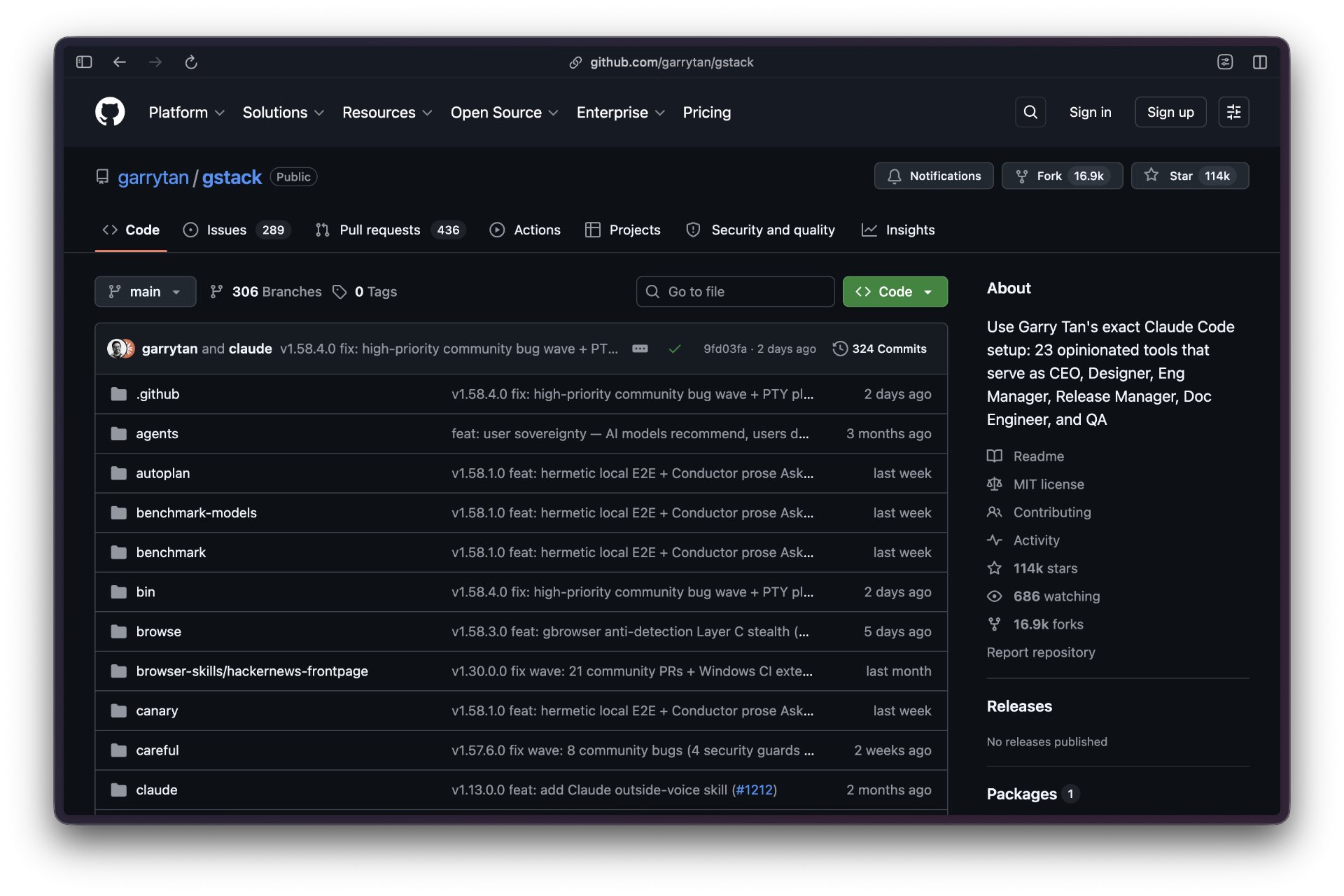
Gstack is an open-source configuration framework that turns Claude Code from a general-purpose coding assistant into a structured virtual development team. Created by Garry Tan, President and CEO of Y Combinator, and released under the MIT license, gstack accumulated over 97,000 GitHub stars and more than 9,100 forks, reflecting significant developer adoption of a more systematic approach to AI-assisted workflows.
At its core, gstack provides 23 specialized slash commands — referred to as “skills” in the project — that activate distinct operational modes within Claude Code. Rather than treating Claude as a reactive tool responding to ad hoc prompts, gstack introduces role-based personas covering functions like CEO, Engineering Manager, Designer, QA Engineer, and Release Manager. Each command carries its own priorities, constraints, and decision-making frameworks. Tan has described the framework as encoding “decades of hard-won startup intuition compressed into a Claude context.”
The framework matters because it solves a specific problem: developers were repeatedly rebuilding the same process scaffolding around AI tools for every project. Gstack structures work according to how sprints actually run — Think, Plan, Build, Review, Test, Ship, Reflect — so that discipline is baked into the workflow rather than requiring it each time.
Overview
💡 What Makes This Guide Different
Most AI tool documentation focuses on ideal scenarios. This guide is closer to an operator’s logbook: what installed cleanly, what broke, what got expensive, and what created real risk.
Gstack is not a product. The official repository is explicit: it is “a configuration framework, not a product” — a structured set of CLAUDE.md files and workflow patterns that extend Claude Code through its native custom slash command system. The technical implementation consists entirely of Markdown instruction files, TypeScript tooling, and a setup script. There is no proprietary runtime; everything runs on Claude Code’s existing mechanism for loading skills.
As of mid-2026, gstack supports Claude Code as its primary host and additionally works with OpenAI Codex CLI, Cursor, OpenCode, Factory Droid, Slate, Kiro, and OpenClaw through platform-specific setup flags. Multi-agent support across eight hosts makes the framework broadly useful, though the skills were designed around Claude Code’s interaction model and work best there.
| Attribute | Details |
|---|---|
| Creator | Garry Tan, CEO of Y Combinator |
| License | MIT (free to use, fork, modify) |
| GitHub stars | 97,000+ (as of mid-2026) |
| Primary platform | Claude Code |
| Additional hosts | Codex CLI, Cursor, OpenCode, Factory Droid, Slate, Kiro, OpenClaw |
| Number of skills | 23 specialist skills + 8 power tools |
| Cost | Free; API costs for Claude Code usage still apply |
Prerequisites
Gstack requires Claude Code access as the primary prerequisite — this is the environment the framework was designed for. While it supports other AI coding assistants, the full skill set and workflow integration are optimized for Claude Code specifically.
Technical setup requires command-line proficiency: installation is a single Git clone command followed by a setup script. No additional API keys or paid subscriptions beyond Claude Code access are needed. Gstack itself is free under the MIT license.
Effective use assumes familiarity with software development workflows. The 23 slash commands represent distinct phases of a real development sprint — CEO review, engineering feasibility, QA, deployment — and users who understand what those phases mean will get more from each command. Users unfamiliar with the concepts of design documentation, code review, or deployment pipelines may find the structured approach educational rather than immediately productive.
No-code alternatives exist for users who want Claude integration without terminal requirements. Platforms like MindStudio offer visual builders that provide some Claude integration without the command-line setup gstack requires.
Installation and Setup
Installation for Claude Code:
git clone --single-branch --depth 1 https://github.com/garrytan/gstack.git ~/.claude/skills/gstack && cd ~/.claude/skills/gstack && ./setup
The --depth 1 flag excludes commit history and keeps the footprint minimal. The setup process takes roughly 30 seconds and creates the CLAUDE.md instruction files that configure Claude Code’s behavior.
After installation, add a “gstack” section to your project’s CLAUDE.md file. This section should list available slash commands and explicitly instruct Claude to use the /browse skill from gstack for web browsing operations rather than default MCP tools. Without this configuration step, Claude Code may not prioritize gstack’s skills as intended.
Verification: open a new Claude Code window and type /office-hours. If it triggers without errors, installation succeeded. The presence of all 23 skills in the autocomplete menu confirms full integration.
For other platforms, replace the clone path and add the appropriate host flag:
- Codex CLI: clone to
~/.codex/skills/gstack, run./setup --host codex - Cursor: clone to
~/.cursor/skills/gstack, run./setup --host cursor
For team deployments, append --team during setup to enable shared configuration across multiple developers on the same codebase.
Core Concepts: How Gstack Actually Works
Gstack enhances Claude Code output through three interconnected mechanisms: role-based context, sequential workflow, and accumulated knowledge.
Role-based context — Each slash command activates a distinct cognitive mode. /plan-ceo-review challenges product scope and market viability from an investor-backed perspective. /plan-eng-review focuses on technical implementation and architectural risk. /review applies a QA engineer’s checklist covering security, performance, and maintainability. Claude doesn’t switch personalities arbitrarily — each persona has defined priorities and constraints encoded in the skill’s CLAUDE.md file.
Sequential workflow — The 23 skills are organized around the sprint lifecycle: Think, Plan, Build, Review, Test, Ship, Reflect. Each phase produces artifacts consumed by subsequent commands. /office-hours generates a design document that /plan-ceo-review reads before challenging scope. This produces markedly different output than running /plan-ceo-review in isolation, because the review has context about what was actually proposed.
Accumulated knowledge — The layered CLAUDE.md configuration files create persistent context across sessions. When /retro runs after deployment, it writes lessons learned that inform the next feature’s planning phase. Over successive sprints, the system encodes project-specific decisions — what architectural patterns worked, what broke, what the codebase actually needs — rather than starting fresh every session.
Skill Reference
| Phase | Key Skills | Purpose |
|---|---|---|
| Think | /office-hours | Product consultation and idea validation; generates design doc |
| Plan | /plan-ceo-review, /plan-eng-review, /design-consultation | Scope challenge, technical feasibility, design alignment |
| Build | /ce:plan | Implementation planning with accumulated context |
| Review | /review, /ce:review | Code quality, security, maintainability; accumulated learnings |
| Test | /qa, /qa-only | Dedicated testing from a QA engineer persona |
| Ship | /ship, /canary, /setup-deploy, /land-and-deploy | Production deployment, staged rollout, deployment configuration |
| Reflect | /retro, /document-release | Post-deployment reflection; documentation that feeds future planning |
| Safety | /careful, /freeze, /guard | Control how aggressively Claude proposes changes |
| Browse | /browse | Web browsing; configure CLAUDE.md to prefer this over default MCP |
Basic Usage Pattern
The 11-step workflow documented by practitioners divides into two phases: building the right thing (steps 1–4) and building it right (steps 5–9), with step 11 feeding lessons back into future planning.
Start every new feature with /office-hours. This produces a design document that frames the problem before any code is written. Run /plan-ceo-review to challenge scope and market fit, then /plan-eng-review to assess technical feasibility and identify architectural risks. These three commands often surface conflicts between business value and implementation complexity that unstructured conversations miss.
Move to /ce:plan for implementation planning, then implementation itself. Use /review before shipping — it applies a consistent checklist that casual code reviews skip. Run /qa for testing, /ship for deployment, and /retro after. The output of /retro feeds into the next feature’s planning cycle.
Advanced Techniques
Front-loading validation is the most effective token optimization. Running /office-hours → /plan-ceo-review → /plan-eng-review before any code generation costs hundreds of tokens but can prevent generating thousands of tokens of code that miss product requirements.
Safety guardrails control scope creep. Use /freeze during exploratory discussions to prevent Claude from proactively rewriting entire files when reviewing isolated functions. Use /careful when you need verbose explanations. Unfreeze only for targeted implementation bursts. These modes persist across commands until explicitly changed — a common source of confusion for new users.
Fresh sessions between phases reduce per-session token consumption significantly. Opening a new Claude Code session at major workflow transitions (end of Plan phase, end of Build phase) rather than accumulating context across an entire sprint can reduce token costs by 40–60% compared to continuous conversations.
Team configurations use ./setup --team to create shared configuration files that prevent redundant context loading across developers working on the same codebase.
Comparing Results: With and Without Gstack
The measurable differences appear in three areas:
Planning accuracy — Running the three-command planning sequence catches scope problems and technical constraints that unstructured conversations miss. The CEO review step challenges product scope in ways that prevent building features nobody needs. The engineering review identifies architectural risks before code is written.
Code quality — The /review skill applies a consistent checklist covering security, performance, and maintainability concerns. The /qa command produces more useful test coverage because it operates from a QA engineer persona with explicit testing priorities, rather than treating testing as an afterthought.
Knowledge accumulation — As described by practitioners, “next time you run step 6, the plan phase already knows everything you learned this time.” The document generation commands create artifacts that subsequent planning cycles reference, preventing repeated mistakes that occur when each AI interaction starts from scratch.
The framework works best for operators who want structured AI-assisted sprints rather than just code completion. It is not an improvement for developers who prefer rapid ad hoc iteration without workflow structure.
Common Pitfalls
Skipping CLAUDE.md configuration — Installation without updating the project CLAUDE.md to list gstack skills and instruct Claude to use /browse is the most common failure. Skills may appear installed but not function as intended.
Using skills out of sequence — Running /ship before /review or skipping /plan-ceo-review after /office-hours breaks the knowledge accumulation chain. Each command builds context for subsequent steps; jumping ahead loses that continuity.
Wrong platform path — Cursor requires ~/.cursor/skills/gstack. Codex requires ~/.codex/skills/gstack. Using the default Claude Code path regardless of IDE is a frequent error.
Ignoring safety guardrails — The /careful, /freeze, and /guard commands modify how aggressively Claude proposes changes. These modes persist until explicitly changed. Users who forget a guardrail is active often report confusing behavior during implementation phases.
Forcing gstack onto non-startup contexts — The framework is opinionated and optimized for Garry Tan’s development approach. Adapting it for non-startup contexts without modifying the underlying personas often produces disappointing results. The MIT license means forking and customizing is straightforward.
Resources
Official gstack repository — Source code, CLAUDE.md files, and installation instructions
SitePoint: Garry Tan’s gstack Overview — Role-based system and use case analysis
Augment Code: gstack Analysis — Technical breakdown of the skill architecture
r/ClaudeAI: 11-Step Workflow Documentation — Community-documented implementation guide
PyShine: Opinionated Claude Code Tools — Process-oriented architecture analysis
mager.co: gstack Claude Plugin Breakdown — Setup and session management patterns
Operator Verdict
Gstack delivers measurable improvements in planning accuracy, code quality, and session-to-session knowledge retention for teams willing to operate within its structured workflow. The 97,000+ GitHub stars reflect genuine developer interest, not hype — the framework solves a real problem: developers repeatedly rebuilding process scaffolding for every project.
The cost is structural commitment. Gstack is not a drop-in improvement; it requires following the sprint sequence for the knowledge accumulation benefits to materialize. Developers who want to cherry-pick individual commands without the surrounding workflow will find it less useful than the documentation suggests.
For solo developers or small teams who want to codify a systematic development process into their AI coding sessions, gstack is worth an hour of evaluation time. The MIT license, zero cost, and documented case where Tan reportedly shipped 600,000+ lines of production code in 60 days while running YC full-time make the evaluation low-risk.
Teams with established processes that work should evaluate carefully before adopting gstack’s opinionated sprint structure. The workflow is designed around Garry Tan’s approach to startup development; it may complement or conflict with existing team norms depending on how closely those align.