OpenAI’s Codex Pet Theater Turns Agent Status Into a Desktop Companion
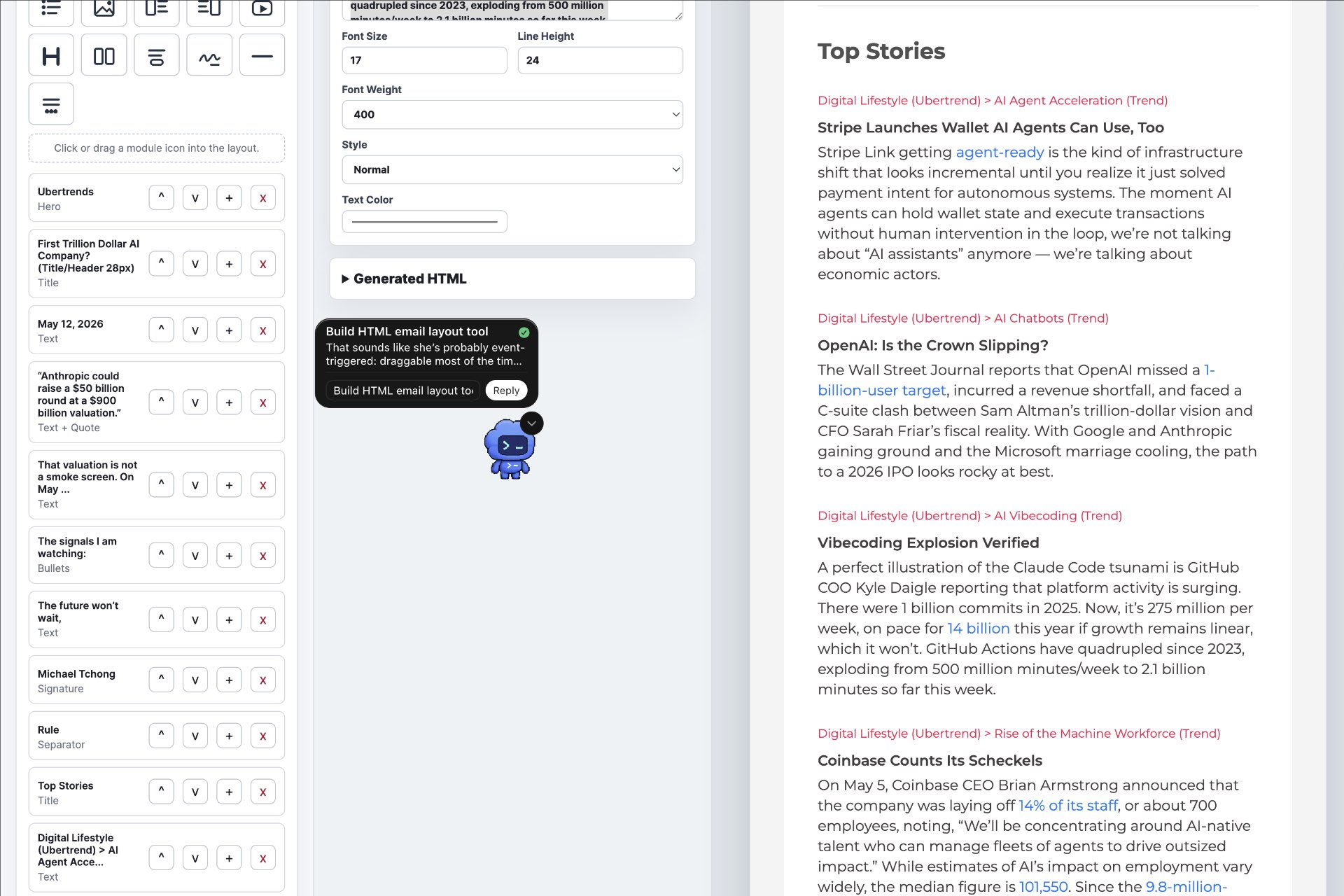
OpenAI’s Codex Pets look like a joke until you treat them as a status layer for agentic coding. The pet is not the worker; it is the theater around the worker, a floating companion that keeps Codex activity visible while the user is in another app, watching for three useful states: running, waiting for input, and ready for review.
Overview
OpenAI’s Codex app has grown from a coding assistant into a broader command center for agentic development work. The app now includes project threads, agent configuration, Git controls, MCP integrations, browser use, computer use on macOS, context-aware suggestions, memories, and a customization layer for appearance and behavior, all documented in the Codex app settings guide.
The newest attention-grabber is Codex Pets: optional animated companions that sit in a floating overlay and show what Codex is doing. According to OpenAI’s settings documentation, pets display the active thread, reflect whether Codex is running, waiting for input, or ready for review, and pair that state with short progress prompts for quick scanning.
First Impressions
Codex Pets initially feel like a side quest. A desktop coding app with animated companions sounds more like Clippy nostalgia than professional tooling, especially for developers who want fewer distractions, not more.
The feature starts to make sense when the app is working across multiple threads. A pet that shows whether Codex is still running, waiting for input, or ready for review can reduce the constant tab-checking that comes with agentic coding workflows. The point is not that the pet makes Codex smarter; the point is that it makes Codex less invisible.
The safest read is that OpenAI is testing a new interaction pattern for background agents. Instead of another progress bar, Codex gets a small character that turns task state into ambient theater.
Architecture
The pet layer should be understood as interface architecture, not agent architecture. OpenAI’s documentation describes pets as optional animated companions for the Codex app, while the underlying work still happens in Codex threads, configuration files, integrations, and agent workflows.
The app’s settings expose the serious machinery behind the playful surface. Agent behavior can be configured through in-app controls or config.toml, personalization can update AGENTS.md, MCP servers can be added under integrations, and Git settings can shape branch names, force-push behavior, commit messages, and pull request descriptions.
Recent Codex updates add more weight to that command-center framing. The Codex changelog describes parallel agent threads, thread forking, project archiving, in-app terminal reading, artifact viewing, browser use, macOS computer use, GitHub PR inspection, and mid-turn steering for directing Codex while it is already working.
The pet is therefore best described as a glanceable overlay for an increasingly complex agent workspace. It does not replace the agent interface; it gives the user a persistent signal that something is happening.
Core Value Proposition
Codex Pets solve a narrow but real problem: background agents are easy to lose track of. When an AI coding agent is running in another window, the user needs to know whether it is progressing, blocked, or ready for review without repeatedly opening the app.
That value is especially relevant for Codex because the product is moving toward multi-threaded, multi-surface work. If a user can start work in the desktop app, inspect GitHub PRs, use browser workflows, connect MCP servers, and steer an active run mid-turn, the status layer matters more than it would in a simple chat interface.
The risk is that the pet becomes novelty instead of signal. The feature works only if it stays quiet, legible, and useful. If it competes for attention, it becomes notification theater; if it gives meaningful task state at a glance, it becomes a durable interaction pattern.
Concrete Example
Imagine asking Codex to update a small internal dashboard. One thread is reviewing the existing project structure, another is changing a React component, and a third is checking whether the local dev server still builds.
Solo Trillion has already used Codex this way in production. Codex designed FutureSight Studio, an HTML email layout tool with a complete control panel, in less than six hours. The featured image shows the Codex Pet running alongside that app: amusing, not mission-critical, but a useful reminder that the pet is attached to a toolchain capable of shipping real software.
Without an ambient status layer, the user has to keep returning to Codex to see whether the work is still active or blocked. With a pet visible, the user can stay in a browser, terminal, or design tool while the overlay shows whether Codex is running, waiting for input, or ready for review.
That sounds cosmetic until the user is managing several active threads. At that point, the pet becomes less about charm and more about reducing state anxiety: the user knows whether to keep working elsewhere, answer a question, or review the generated diff.
Video Demo Notes
The strongest official moving-image references are OpenAI Developers posts showing the feature directly: “Pets. Now in Codex. Use /pet to wake your pet.” and “Customize your Codex pet with /hatch.”
For a longer third-party walkthrough, Pocketful of AI’s “The Codex App Has Pets Now (Stay With Me)” is the best fit because it frames pets in the context of the broader Codex desktop app rather than treating the feature as a standalone gag.
Short-form coverage is also available through “OpenAI Codex Pets: Your New AI Sidekick!”, but the short format is better for confirming the concept than for understanding how the feature fits into daily Codex use.
Prerequisites
Codex Pets require the Codex app and a working Codex setup. OpenAI’s settings documentation places Pets under Settings > Appearance > Pets, where users can select a built-in pet or refresh custom pets from the local Codex home.
The app itself spans several surfaces. The Codex changelog describes native desktop support for macOS and Windows, CLI support across macOS, Linux, and Windows, IDE extensions for VS Code, Cursor, and Windsurf, and mobile access through ChatGPT mobile connecting to a Mac running Codex.
Users who want custom pets need the documented hatch-pet workflow. OpenAI’s settings guide says to install the skill with $skill-installer hatch-pet, reload skills through Cmd+K or Ctrl+K, then ask $hatch-pet to create a new pet.
Security and Compliance
The pet feature itself is not the main security concern. The important review areas are the same ones that apply to Codex generally: what projects Codex can read, what commands it can run, what integrations are connected, and what permissions are granted to browser or computer-use features.
OpenAI’s settings guide gives teams several concrete places to inspect. Agent configuration can live in config.toml, personalization can update AGENTS.md, MCP integrations can be enabled or added, browser access can be managed through allowlists and blocklists, and macOS computer use depends on Screen Recording and Accessibility permissions.
The practical enterprise recommendation is to treat Codex like an agentic development environment, not like a toy with pets. Review workspace trust settings, Git permissions, MCP servers, browser permissions, and computer-use access before letting Codex work against sensitive repositories.
Setup and Configuration
To enable a built-in pet, open Codex settings, go to Appearance, then Pets. Pick a built-in pet, wake it from the app menu or command overlay, or use /pet in the composer to toggle the floating overlay.
To create a custom pet, install the hatch-pet skill with $skill-installer hatch-pet, force-reload skills through Cmd+K or Ctrl+K, then run a prompt such as $hatch-pet create a new pet inspired by my recent projects. Engadget’s coverage also notes that OpenAI described /hatch as the user-facing custom-pet command, so the exact workflow may differ by app version.
Teams should also configure the non-pet settings that affect real work: default file-opening behavior, notification timing, agent configuration, Git settings, MCP integrations, browser permissions, computer-use permissions, personality settings, memories, and archived-thread behavior.
Gotchas
The most important gotcha is expectation management. Pets are status companions, not coding agents. Engadget’s coverage is explicit that they do not code themselves; they report what Codex is working on, when work completes, and when input is needed.
The second gotcha is command drift. OpenAI’s settings page documents /pet and the $hatch-pet skill workflow, while media coverage refers to /hatch for custom pet generation. In a fast-moving desktop app, operators should trust the current in-app command palette and settings screen over older screenshots or social clips.
The third gotcha is distraction. A floating animated companion is useful only if it reduces monitoring overhead. If it pulls attention away from code review, terminal output, or product judgment, tuck it away and rely on standard notifications instead.
Troubleshooting
If the pet does not appear, start with the documented settings path: Settings > Appearance > Pets. Confirm that a pet is selected, then try /pet, Wake Pet from the menu, or Wake Pet from Cmd+K or Ctrl+K.
If a custom pet is missing, reload skills after installing hatch-pet. The settings guide specifically calls out Force Reload Skills after installation, which suggests that custom pets may not appear until Codex refreshes its local skill state.
If the overlay is not helpful during focused work, use Tuck Away Pet from Settings > Appearance or the command overlay. Treat the pet as an optional status surface, not a required part of every Codex session.
Workflows Worth Copying
Use pets as a review trigger: When the overlay says a thread is ready for review, inspect the diff immediately before starting dependent work. This keeps agent output from piling up unchecked.
Pair pets with notifications: Use the pet for glanceable state and standard Codex notifications for completion timing. The combination works better than forcing the pet to carry every alert.
Keep custom pets project-neutral: Create companions that are easy to recognize at small size and do not visually fight the desktop. The best pet for agent work is legible, not elaborate.
Reserve pets for long-running tasks: The overlay is most useful when Codex is doing enough background work that checking the app would interrupt another task. For quick edits, it may be unnecessary.
Audit the serious settings first: Before spending time on custom pets, configure Git behavior, MCP servers, browser permissions, computer-use permissions, and project instructions. The companion is a surface layer; the agent environment is the real system.
Starter Prompts
/pet
Toggle the floating pet overlay from the composer.
$skill-installer hatch-pet
Install the documented custom-pet skill.
$hatch-pet create a new pet inspired by my recent projects
Create a custom pet using the documented skill workflow.
Review the current branch and summarize the safest next diff to inspect.
Use Codex for a practical review task, then let the pet indicate when the work is ready.
Continue the current thread, but pause and ask before changing authentication, billing, or data-model code.
Pair mid-turn steering with explicit guardrails for sensitive areas.
Inspect the local dev server and report whether the UI renders correctly before making changes.
Use the broader Codex app capabilities around local project inspection and browser workflows.
Known Limitations
Codex Pets are a UI layer, not a capability layer. They do not improve code generation, make better architectural decisions, or replace code review. They make Codex state easier to see.
The feature also depends on fast-moving app behavior. Commands, installation steps, and custom-pet flows may change as OpenAI updates the Codex desktop app, so operators should verify the current flow inside Settings and the command overlay.
The broader Codex environment carries more operational risk than the pet itself. Browser use, computer use, MCP servers, Git automation, and project memories all require thoughtful configuration if Codex is being used on valuable or private codebases.
What Comes Next
The interesting future is not “more pets.” It is more legible agent state. Pets are one way to represent whether an agent is working, blocked, or ready, but the underlying need is broader: users need lightweight awareness of background software work without living inside the agent app.
OpenAI’s current Codex trajectory points in that direction. The changelog already emphasizes mid-turn steering, parallel threads, artifact viewing, browser workflows, computer use, and integrations with developer systems. As those features expand, the status layer will need to get more precise.
The next useful iteration would let users map different pet states to different kinds of work: review needed, permission needed, tests failing, branch ready, or human decision required. That would turn pet theater into an operator dashboard.
Resources
- OpenAI Codex app settings
- OpenAI Codex changelog
- Engadget: OpenAI Introduces AI-Generated Pets For Its Codex App
- OpenAI Developers: Use /pet to wake your pet
- OpenAI Developers: Customize your Codex pet with /hatch
- Pocketful of AI: The Codex App Has Pets Now (Stay With Me)
- OpenAI Codex Pets: Your New AI Sidekick!
Operator Verdict
Codex Pets are not important because they are cute. They are important because they reveal a problem every serious agentic tool now has to solve: how do users supervise background work without constantly reopening the agent?
On that question, the feature is more credible than it looks. A floating companion that shows active-thread state, waiting status, and review readiness can make Codex feel less like a black box and more like an accountable worker.
The feature should still be kept in its lane. Pets do not code, do not reduce the need for human review, and do not eliminate the operational risks of browser use, computer use, MCP access, Git automation, or project memories.
Codex Pets work best when they are treated as desktop theater for agent status, not as a standalone product breakthrough. That theater may become useful if it stays quiet, accurate, and tied to real workflow state.
Codex Pets are a small feature with a big signal: as AI coding agents move into the background, the next interface challenge is not just better code generation. It is better operator awareness.